

Reading Your Smart Meter

A quick guide to what the display and numbers mean

How To Read Your Smart Meter?

Your smart meter makes it possible for you to have prepaid energy, and the real-time information it collects and displays in your home can help you manage your energy usage and costs.

But first, you need to learn how to read your smart meter. It’s simple.

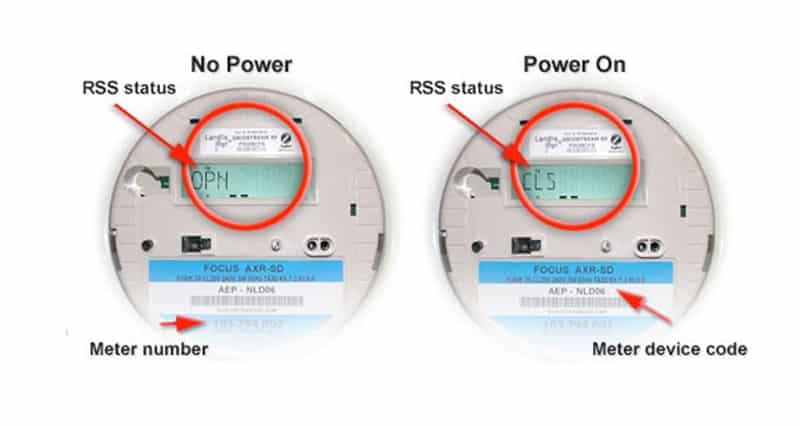
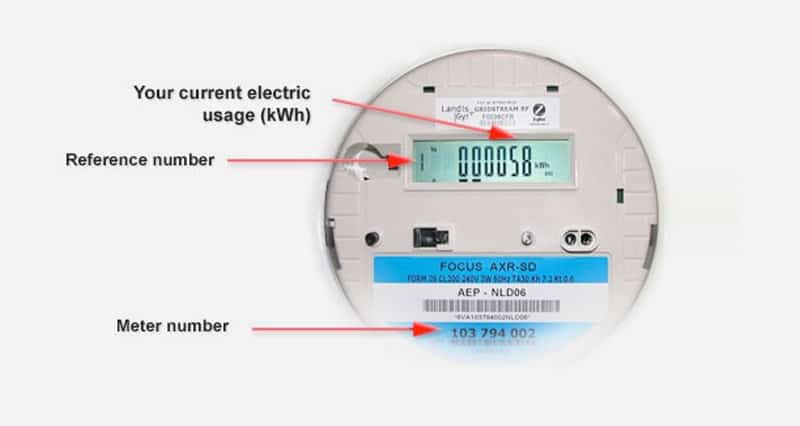
There are three displays on your smart meter.

The first lets you know if your electric service is on. Generally, the display will read “CLS” when the power is on and “OPN” when your electricity is off.

The second shows you how much electricity in kilowatt-hours (kWh) you have used for the current billing term. That’s also called your cumulative usage.
The third number shows your electricity demand reading. Your TDU uses this number to calculate the amount of electricity being used by people in your service area at various times.

Fast Payment

We just need a few details so that we can find your account:

    How can I find my Account Number?

    Your Now Power account number can be found in emails and text messages sent to you by Now Power.

    What is my Service Address Zip Code?

    The zip code of your active service address.
    Call 1-866-302-3233 or text us at 61959 if you need further assistance.

    Sign Up Today! 844-774-0030